> For the complete documentation index, see [llms.txt](https://mapol.gitbook.io/home/llms.txt). Markdown versions of documentation pages are available by appending `.md` to page URLs; this page is available as [Markdown](https://mapol.gitbook.io/home/blog/malware-analysis/ransomware/ra-world-ransomware.md).

# RA World Ransomware

Dec 27, 2025

According to the [**SOC Radar Threat Actor Profile**](https://socradar.io/dark-web-profile-ra-world/), the RA World ransomware is operated by the RA Group or possibly by another group operating under the same hood. They also use applications like Telegram or Tox to stay in touch with victims.

I found this sample on [**MalwareBazaar**.](https://bazaar.abuse.ch/sample/89e0b349ffce6895b098992dde220fb813dfea443d6cb36e812c6bcfad423b1a/)

<figure><img src="https://miro.medium.com/v2/resize:fit:875/0*nJhkJwDA-wHrQU4B.jpeg" alt="" height="385" width="700"><figcaption><p><a href="https://unit42.paloaltonetworks.com/ra-world-ransomware-group-updates-tool-set/">Unit 42 - From RA Group to RA World: Evolution of a Ransomware Group</a></p></figcaption></figure>

***

### **Table of Contents** <a href="#id-69bb" id="id-69bb"></a>

1. [Sample Overview](#id-6423)
2. [Command line Parser](#c5a6)
3. [Lastest Process Shutdown](#eae5)
4. [Debug Logs](#id-3b38)
5. [Service Stop (T1489)](#eaee)
6. [Impair Defenses: Disable or Modify Tools (T1562.001)](#id-9a6c)
7. [Inhibit System Recover (T1490)](#id-97ab)
8. [Network Share Discovery (T1135)](#id-3b12)
9. [File and Directory Discovery (T1083)](#id-99bf)
10. [Process Discovery (T1057)](#d660)
11. [Data Encrypted for Impact (T1486)](#id-2348)
12. [Execution Guardrails: Mutual Exclusion (T1480.002)](#id-526c)
13. [System Network Connections Discovery (T1049)](#id-23b1)
14. [Local Storage Discovery (T1680)](#fe53)
15. [Indicator Removal: File Deletion (T1070.004)](#a180)
16. [Execution Flow](#a091)
17. [Conclusion](#id-742f)
18. [IOCs](#id-82b8)
19. [YARA Rule](#id-8c94)
20. [Additional Resources](#d32e)

***

### **Sample Overview** <a href="#id-6423" id="id-6423"></a>

From the basic triage of the sample, we can see that it was written in C++ and compiled around Jan 31, 2024, using Microsoft Visual Studio 2019. Also, the entropy values show that this sample did not use any packing or obfuscation methods.

<figure><img src="https://miro.medium.com/v2/resize:fit:875/1*O3kXWr9WUMqOSq21TNGmGg.png" alt="" width="563"><figcaption><p>Figure 1. Identified the compile time and languages used by the sample.</p></figcaption></figure>

<figure><img src="https://miro.medium.com/v2/resize:fit:875/1*7JjQTm6kwIrjfdCeo74-_w.png" alt="" width="563"><figcaption><p>Figure 2. The entropy values of a sample.</p></figcaption></figure>

***

### **Command Line Parser** <a href="#c5a6" id="c5a6"></a>

The `CommandLineW` is set to the returned of the `GetCommandLineW` function, which returns a pointer to the command line of the current process. Then the `v4` is assigned to the `CommandLineToArgvW` function, making `v4` an array of unicode strings. This is meant to retrieve the command line arguments of the current process.

<figure><img src="https://miro.medium.com/v2/resize:fit:803/1*LARrM1yTW9e-9PvlCKS29A.png" alt="" width="563"><figcaption><p>Figure 3. Command line handler of the current process.</p></figcaption></figure>

Next, `v5` is assigned the return value of the `sub_140015070` function. The argument of interest passed to this function is the word `debug`. If `v5` evaluates to true, the code block that calls the `sub_140015100` function with `v5` as its argument is executed.

<figure><img src="https://miro.medium.com/v2/resize:fit:746/1*QVTZpiAXa_xi1VJaSlPvhg.png" alt="" width="563"><figcaption><p>Figure 4. The address of process command line passed to the function.</p></figcaption></figure>

In the `sub_140015070`, `v3` is assigned the value of `a1`, which, as mentioned in the previous analysis, represents the number of command line arguments. If no command line arguments are provided, for example, if `a1` is zero or less than one the function returns.

<figure><img src="https://miro.medium.com/v2/resize:fit:734/1*O91QUZiZhqxKAHnNHTALcQ.png" alt="" width="563"><figcaption><p>Figure 5. Basic checks are performed, and values are assigned.</p></figcaption></figure>

Inside the infinite loop, it checks whether the first character of `v6` is equal to `-`. If it is, another loop is executed to verify whether `v8` is also equal to `-`, with `v8` being assigned the character at the second index of the `v6` array. This continues until `v8` is no longer equal to `-`, at which point `v6` will point to the current character that is not a hyphen i.e., the character that comes after the sequence of hyphens.

<figure><img src="https://miro.medium.com/v2/resize:fit:745/1*E30yMmShJjBdQQEhttd-Fw.png" alt="" width="563"><figcaption><p>Figure 6. Loop until it encounters a hyphen character.</p></figcaption></figure>

After that, another loop begins. Inside this loop, the `v9` is assigned the result of comparing the characters of `v8` and `a3` one by one. If the characters do not match `a3`, the loop continues running until it encounters the `=` character. However, to verify whether the characters match or not, the comparison is primarily handled by `v7` and `v10`.

Based on the updated value of `v6` from the previous loop, `v6` will now point to the current character that appears before the equal sign.

<figure><img src="https://miro.medium.com/v2/resize:fit:540/1*rHwfI2iYK6Sj1umJCtfclg.png" alt="" width="563"><figcaption><p>Figure 7. The loop continues until it encounters an equal sign.</p></figcaption></figure>

Based on this behavior, the infinite loop checks whether the arguments match. If they do not, it returns zero. However, if they do match, the value of `v6` is returned, which contains the characters that appear after the equal sign.

<figure><img src="https://miro.medium.com/v2/resize:fit:526/1*_riNc-jcSAHVnir1_TJolg.png" alt="" width="563"><figcaption><p>Figure 8. The v6 is returned from the function.</p></figcaption></figure>

***

### **Lastest Process Shutdown** <a href="#eae5" id="eae5"></a>

The `SetProcessShutdownParameters` is called where zero is passed, which represents the system-reserved last shutdown range. This ensures that when the system is shutting down, this process will be one of the last to be terminated.

<figure><img src="https://miro.medium.com/v2/resize:fit:788/1*RLyzG0Fgvvr9GLT7SjgwsQ.png" alt="" width="563"><figcaption><p>Figure 9. Set the current process as the last one to be terminated.</p></figcaption></figure>

***

### **Debug Logs** <a href="#id-3b38" id="id-3b38"></a>

Step into `sub_140015100` function, we see that it attempts to create a file using the `CreateFileW` function. The argument of interest is `lpFilename`, which corresponds to the word returned from the previously analyzed function. The value `0x40000000u` represents `GENERIC_WRITE`, `1u` represents `FILE_SHARE_READ`, `4u` represents `OPEN_ALWAYS`, and `0x80u` represents `FILE_ATTRIBUTE_NORMAL`.

<figure><img src="https://miro.medium.com/v2/resize:fit:875/1*KHdfa53rE_HJnCIcd7-gZw.png" alt="" height="189" width="700"><figcaption><p>Figure 10. Create a normal file that other processes can interact with.</p></figcaption></figure>

So, in short, it create a normal file that is not hidden or anything. It also allows other processes to access this file while the current process is working with it. However, if the file does not exist, it will be created.

<figure><img src="https://miro.medium.com/v2/resize:fit:875/1*uGKbF1KMC475dlNQewZQfg.png" alt="" width="563"><figcaption><p>Figure 11. The CreateFileW function and its parameters.</p></figcaption></figure>

However, based on the return value of `sub_140015070` function, which is used for the current process’s command line handle, the process will not terminate when no arguments are provided or when they are provided incorrectly, and those options will simply not work properly.

<figure><img src="https://miro.medium.com/v2/resize:fit:875/1*0h8Boeq8cIg6bCyDpkI08g.png" alt="" height="332" width="700"><figcaption><p>Figure 12. The file cannot be created because no file path is provided.</p></figcaption></figure>

If the process’s command line argument is input correctly for example, in this case, using `--debug=<path to file>` the call to `CreateFileW` works correctly, and the file is created properly.

<figure><img src="https://miro.medium.com/v2/resize:fit:875/1*7c1sd9pQr3h1NqlcgNoeug.png" alt="" height="334" width="700"><figcaption><p>Figure 13. The file is created correctly because the file path is provided.</p></figcaption></figure>

Now, if we execute the ransomware with the correct option format, the content will not be written until the program finishes and exits.

<figure><img src="https://miro.medium.com/v2/resize:fit:875/1*nyojuJcptcF0_t6tgMro_g.png" alt="" height="132" width="700"><figcaption><p>Figure 14. Contents of the debug file.</p></figcaption></figure>

The function `sub_140015160` is responsible for writing debug log information. It calls `EnterCriticalSection` and `LeaveCriticalSection`, which indicates that debug logging and error information are handled separately from the main thread.

<figure><img src="https://miro.medium.com/v2/resize:fit:840/1*keuQ7OBqb90Zn5dZq7yj3g.png" alt="" width="563"><figcaption><p>Figure 15. A function that writes error information into a file related to the debug command.</p></figcaption></figure>

***

### **Service Stop (T1489)** <a href="#eaee" id="eaee"></a>

If we look at the main function procedurally, the next function to analyze is `sub_140012400`. The variable `v2` is assigned the return value of the `OpenSCManagerA` function. Its argument of interest, `0xF003F`, represents `SC_MANAGER_ALL_ACCESS`, indicating that the function is attempting to open the Windows Service Control Manager with full access rights. If the connection fails, `NULL` is returned, otherwise a handle to the Service Control Manager database is returned.

<figure><img src="https://miro.medium.com/v2/resize:fit:875/1*AeN6l0wVQ8fbxf50Itm-qg.png" alt="" height="260" width="700"><figcaption><p>Figure 16. Established the Service Control Manager handle.</p></figcaption></figure>

When the condition is met, the `v4` is assigned with a pointer to `off_14000E840`. The for-loop then begins with a loop count of `44`, which will be relevant in Figures 17 and 18. Inside the loop, the code attempts to open an existing service by calling `OpenServiceA` using the service name referenced by `off_14000E840`.

<figure><img src="https://miro.medium.com/v2/resize:fit:875/1*4Zlv3J8gKut_wO01pp2vOg.png" alt="" height="255" width="700"><figcaption><p>Figure 17. Pointer to the offset that references the actual service name.</p></figcaption></figure>

Where `off_14000E840` is used to store the address of several service names that were referenced earlier in the analysis.

<figure><img src="https://miro.medium.com/v2/resize:fit:853/1*ZnjwRltymBLVFov7yhScPA.png" alt="" width="563"><figcaption><p>Figure 18. List of service names (1/2).</p></figcaption></figure>

<figure><img src="https://miro.medium.com/v2/resize:fit:734/1*4iqr16HD9yXO-WXR-5i7gQ.png" alt="" width="563"><figcaption><p>Figure 19. List of service names (2/2).</p></figcaption></figure>

Next, the `QueryServiceStatusEx` function is called with the argument `v7`, which represents a handle to the service, `SC_STATUS_PROCESS_INFO`, a buffer cast to bytes, `0x24u`, which represents the size of the buffer, and `cbBufSize`, which specifies the number of bytes required to store all of the status information. If the function succeeds, a non-zero value is returned. Otherwise, it returns zero.

If the returned value is not zero, the `EnumDependentServicesA` function is called. The argument of interest is `1u`, which represents `SERVICE_ACTIVE`, followed by a buffer size used to store the status information

<figure><img src="https://miro.medium.com/v2/resize:fit:875/1*r_3e1tzhFPBFR8iZ9hnW9A.png" alt="" height="182" width="700"><figcaption><p>Figure 20. Query Windows Service Control status.</p></figcaption></figure>

In that earlier analysis, the first call to `EnumDependentServicesA` was meant for error handling rather than for returning information about an active service. However, in the second call to `EnumDependentServicesA`, active services are the ones being processed. First the function `OpenServiceA` serve the same purpose as the previous anaylsis `open an existing service`, but this time an active one.

Now, if no error is returned, the `ControlService` function is called with the arguments `v10`, which represents a previously opened service, `1u`, which represents `SERVICE_CONTROL_STOP`.

<figure><img src="https://miro.medium.com/v2/resize:fit:875/1*DBi_rHOIVBQI_2-nOE9ilA.png" alt="" width="563"><figcaption><p>Figure 21. Stop Windows Service Control (1/2).</p></figcaption></figure>

In short, this is meant to stop any active windows services by using `EnumDependentServicesA` and `QueryServiceStatusEx` to query their status, and `ControlService` to stop them.

<figure><img src="https://miro.medium.com/v2/resize:fit:875/1*fp3QnvXDuLi_nCzeGatO7g.png" alt="" width="563"><figcaption><p>Figure 22. Stop Windows Service Control (2/2).</p></figcaption></figure>

***

### **Impair Defenses: Disable or Modify Tools (T1562.001)** <a href="#id-9a6c" id="id-9a6c"></a>

In the function `sub_1400126E0`, a snapshot of all currently running processes and threads in the system is first created using the `CreateToolhelp32Snapshot` function. The argument `0xFu` represents `TH32CS_SNAPALL`, and zero represents the current process, where the `Toolhelp32Snapshot` is used to store the returned value. Then, the `Process32FirstW` function is called to retrieve information about the first process in the snapshot.

<figure><img src="https://miro.medium.com/v2/resize:fit:684/1*0HJ1zowiqG3bGIhUymoT5Q.png" alt="" width="563"><figcaption><p>Figure 23. Create a snapshot based on the current running processes.</p></figcaption></figure>

Next, the do while and while loops begin and loop through each currently running process stored in the snapshot, terminating each one of them.

By doing that, it uses a `v2` assigned to an offset `off_14000E9B0`, where this offset stores the address of the process to be terminated, as shown in Figure 27 and Figure 28. The `lstrcmpW` function is then called with its arguments, where the first argument is a pointer to `v2`, which represents the values of the addresses of the process names stored in the offset. `pe.szExeFile` represents the process name according to the `PROCESSENTRY32W` structure.

<figure><img src="https://miro.medium.com/v2/resize:fit:645/1*99nnWQ4h5rS5Iaavct8dew.png" alt="" width="563"><figcaption><p>Figure 24. Compare a process name.</p></figcaption></figure>

The `v3` is then assigned with the `OpenProcess` function, using the argument `1u`, which represents `PROCESS_TERMINATE`. This access right is important, as it is required to be able to use the `TerminateProcess` function.

If it successfully opens the process, the function `TerminateProcess` is then called with `v3` as the argument, which represents a handle to the process, and `9u`, which represents the exit code. After the process is terminated, `CloseHandle` is called to release system resources.

<figure><img src="https://miro.medium.com/v2/resize:fit:615/1*t6gsPj3rLFKoroSwymnh3g.png" alt="" width="563"><figcaption><p>Figure 25. Open a process based on its ID and terminate it.</p></figcaption></figure>

Now, to identify the purpose of the do while loop, the `Process32NextW` function is used to retrieve information about the next process recorded in a system snapshot.

<figure><img src="https://miro.medium.com/v2/resize:fit:595/1*0KEzawe0WRWgSkKlw01rJQ.png" alt="" width="563"><figcaption><p>Figure 26. Retrieve information about the next process in the snapshot.</p></figcaption></figure>

List of addresses of process names, where they are stored in offset `off_14000E9B0`, which will be used to terminate the processes by ransomware.

<figure><img src="https://miro.medium.com/v2/resize:fit:634/1*-73H8hxWl8M4atEg1arbRg.png" alt="" width="563"><figcaption><p>Figure 27. List of process names (1/2).</p></figcaption></figure>

<figure><img src="https://miro.medium.com/v2/resize:fit:540/1*MPbj_mYdP7iDVdZ54ZIktw.png" alt="" width="563"><figcaption><p>Figure 28. List of process names (2/2).</p></figcaption></figure>

***

### **Inhibit System Recover (T1490)** <a href="#id-97ab" id="id-97ab"></a>

In the function `sub_140012340`, the `ShellExecuteW` function is called, which can be used to execute operating system commands. The argument provided attempts to delete shadow copies by abusing `vssadmin.exe`. This is meant to hinder the recovery of a compromised system.

<figure><img src="https://miro.medium.com/v2/resize:fit:875/1*IW40DgjGkGzlEunW5BVQiQ.png" alt="" height="427" width="700"><figcaption><p>Figure 29. Used vssadmin to delete shadow copies.</p></figcaption></figure>

Also, if we step out of that function, we can see the use of the `SHEmptyRecycleBinA` function, which is meant to empty the Windows Recycle Bin to ensure that it contains nothing.

<figure><img src="https://miro.medium.com/v2/resize:fit:839/1*cmohWEtBBPZ0mtGyr9IRqA.png" alt="" width="563"><figcaption><p>Figure 30. Attempting to clear the Recycle Bin.</p></figcaption></figure>

***

### **Network Share Discovery (T1135)** <a href="#id-3b12" id="id-3b12"></a>

We can see two other words, `shares` and `paths`, passed to the function `sub_140015070`, which is used to handle the process command line. The return values of these calls are assigned to the `v16` and `v17`.

<figure><img src="https://miro.medium.com/v2/resize:fit:875/1*fVuj7iu4kHMfiTw7asSBRA.png" alt="" width="563"><figcaption><p>Figure 31. Command line options shares and paths.</p></figcaption></figure>

So, if the result of `v16` turns out to be true, it will then get the length of the word in `v16` and assign it to a `v19`. If the length is greater than zero, it will loop through each character.

<figure><img src="https://miro.medium.com/v2/resize:fit:875/1*RX1obRQ8Ma5v6aMFAm6c1Q.png" alt="" width="563"><figcaption><p>Figure 32. Loop through each character of the index.</p></figcaption></figure>

In the do while loop, the length of `v16` was retrieved again, but this time it was assigned to the `v22`. Then, the function `lstrcpyW` was called to copy the value of `v16` into the allocated memory. In this context, `v22` refers to the buffer where `v16` is stored. Next, the functions `sub_140019430` and `sub_14001D8B0` were called with `v22` passed as an argument, where `sub_14001D8B0` is just used to free the allocated memory.

<figure><img src="https://miro.medium.com/v2/resize:fit:875/1*WKxbh6woD98K3uYKqj57Yw.png" alt="" width="563"><figcaption><p>Figure 33. Memory is allocated, and v22 is passed to the function.</p></figcaption></figure>

If we step into `sub_140019430` function, we can see a call to the `NetShareEnum` function, which is used to retrieve information about each shared resource on a server.

In this call, the arguments of interest are `lpString2`, which corresponds to the server name, and `1u`, which corresponds to the level. Level `1` returns information about shared resources, including the resource name, type, and an associated comment.

<figure><img src="https://miro.medium.com/v2/resize:fit:875/1*Px7MnZ-w-HG03j3Ql2nmPg.png" alt="" height="128" width="700"><figcaption><p>Figure 34. Shared resource information retrieved.</p></figcaption></figure>

Inside this loop, the first condition checks whether the length of `v4` is greater than two. If it is not, the next value is used for comparison. If the length of `v4` is greater than two, the function `lstrcmpW` is called to compare `v4` with `ADMIN$`.

<figure><img src="https://miro.medium.com/v2/resize:fit:875/1*uALyaDpDzWeFHEpdwJWzSg.png" alt="" width="563"><figcaption><p>Figure 35. Server name length comparison and word matching.</p></figcaption></figure>

As you can see, it checks whether the first value is equal to `ADMIN$`. Since it is, the `je` instruction is triggered, jumping to the point where the value is incremented so that the next value can be used for comparison.

<figure><img src="https://miro.medium.com/v2/resize:fit:875/1*6liXVEYriCrn4sLsFSJzkQ.png" alt="" width="563"><figcaption><p>Figure 36. In the condition where the strings match.</p></figcaption></figure>

Now, if the value is greater than two and not equal to `ADMIN$`, which means the `je` instruction is not triggered, the string concatenation is performed by calling the `lstrcatW` function. The result of the concatenation is `\\\\<server name>\\<share>`.

<figure><img src="https://miro.medium.com/v2/resize:fit:875/1*EUL5wh2CPbrHR-0qS4-6Rg.png" alt="" height="275" width="700"><figcaption><p>Figure 37. Result of string concatenation to the UNC path.</p></figcaption></figure>

Next, the function `sub_140018E60` is called. Checking the file on the shared server shows that its extension is appended with `.YoyVd`, and the file contents are corrupted due to encryption. However, files that are not shared and remain only on the server’s local drive are not encrypted.

<figure><img src="https://miro.medium.com/v2/resize:fit:875/1*yE9e27r1qGx0UqDcmO_5KQ.png" alt="" height="250" width="700"><figcaption><p>Figure 38. sub_140018E60 leads to file encryption.</p></figcaption></figure>

Similar to how `v16` works, the `v17` also checks if the returned value is true or not. If it is not, it will use the `goto` statement to jump to the label where the mutex is being checked and created.

<figure><img src="https://miro.medium.com/v2/resize:fit:689/1*kpvPhQN0LfY21OwHx2e3cw.png" alt="" width="563"><figcaption><p>Figure 39. Loop through each character of the index, just like in v16.</p></figcaption></figure>

When it reaches the next do while loop, it retrieves the length of `v17`, which contains a process command line that has already been parsed, and assigns the result to `v27`. Memory is then allocated by calling the `sub_14001D930` function, and `lstrcpyW` is used to copy the value of `v17` into the allocated memory.

Next, the length of `v28` is checked to determine whether it is equal to two and whether the second character in the array is a colon. If both conditions are met, the function `sub_1400195A0` is called. Otherwise, `sub_140018E60` is called instead.

In short, it checks whether the parsed process command line contains only two characters and whether the second character is a colon.

<figure><img src="https://miro.medium.com/v2/resize:fit:739/1*f_JcwZUN8elys4KqNdxBnA.png" alt="" width="563"><figcaption><p>Figure 40. Check the format of a drive.</p></figcaption></figure>

Now, if we step into `sub_1400195A0` function, memory is allocated and assigned to `v2`, and `v3` is used as a copy of `v2`, where one is used for a network share drive and the other for a local drive. Then, the function `lstrcpyW` is used to copy the string into the allocated memory, and `GetDriveTypeW` is called, with the result assigned to `DriveTypeW`.

<figure><img src="https://miro.medium.com/v2/resize:fit:781/1*K2CF3ikk7yo59lfOpXoXuQ.png" alt="" width="563"><figcaption><p>Figure 41. Set up the format for a network share and retrieve the drive type.</p></figcaption></figure>

The condition is then checked. If the drive type is not `DRIVE_CDROM` and the drive type is `DRIVE_REMOTE`, memory is allocated and the function `WNetGetConnectionW` is called to retrieve the name of the network resource associated with the local device. If the function returns without an error, meaning it successfully retrieves the network resource associated with the local drive, the function `sub_140018E60` is then called.

However, if `DriveTypeW` is not `DRIVE_CDROM` or `DRIVE_REMOTE` and the drive type is successfully retrieved, the function `sub_140018E60` will also be called.

<figure><img src="https://miro.medium.com/v2/resize:fit:646/1*KHINCS8VyS8ekQxYuYxSmg.png" alt="" width="563"><figcaption><p>Figure 42. Check if the drive type is not DRIVE_CDROM and is DRIVE_REMOTE.</p></figcaption></figure>

As you can see in the register, the value that will be passed as an argument to `GetDriveTypeW` is `\\\\?\G:`, which was previously assembled by calling the `lstrcpyW` function.

<figure><img src="https://miro.medium.com/v2/resize:fit:875/1*45VlV_dFnaPXKYMIR1qhkw.png" alt="" height="155" width="700"><figcaption><p>Figure 43. The assembled characters of the network share format are used as an argument.</p></figcaption></figure>

Also, when it comes to the condition that checks the drive type, none of the jumps are taken because it does not match any of them (e.g., it is not a network share drive). Instead, the target is shifted to the local drive. As a result, the call to `sub_140018E60` is triggered. As noted in the previous analysis, this function leads to the encryption of files.

<figure><img src="https://miro.medium.com/v2/resize:fit:875/1*mfr_RthVMrxUA8fes0DgPQ.png" alt="" height="161" width="700"><figcaption><p>Figure 44. A jump condition where the drive type is DRIVE_REMOTE is not taken.</p></figcaption></figure>

The file on drive `G`, which is a local drive, is now encrypted. However, files stored on other drives are safe and can function properly. This behavior can also apply to network shares.

<figure><img src="https://miro.medium.com/v2/resize:fit:875/1*hp8Q8jbgBUE9R465eecJiw.png" alt="" width="563"><figcaption><p>Figure 45. Again, sub_140018E60 leads to file encryption.</p></figcaption></figure>

***

### **File and Directory Discovery (T1083)** <a href="#id-99bf" id="id-99bf"></a>

In the `sub_140018E60` function, `EnterCriticalSection` and `LeaveCriticalSection` are used to handle multithreading, and the `sub_140017B70` function is called within this context.

<figure><img src="https://miro.medium.com/v2/resize:fit:725/1*XeXS_4FDva-BaFwWfpgrgg.png" alt="" width="563"><figcaption><p>Figure 46. sub_140017B70 is called within a thread.</p></figcaption></figure>

Next, memory is allocated, Then, `lstrcpyW` is called to copy the values of `a1` into the allocated memory. However, similar to the previous analysis, this time `lstrcatW` is called to append `\\*` to the values stored in the allocated memory.

The function `FindFirstFileW` is called to search a directory for a file or subdirectory that matches a specific name. Here, `v6` represents the directory or path and the file name, while the address of `FindFileData` pointer to a structure that receives information about the found file or directory.

<figure><img src="https://miro.medium.com/v2/resize:fit:875/1*mf5OeQxIn2I6-F9lm-Dvvg.png" alt="" width="563"><figcaption><p>Figure 47. Searching for Directories and Files.</p></figcaption></figure>

If the function `FindFirstFileW` returns a failure, this means it fails to locate the files. It then retrieves the character length `a1` and passes it as an argument to the function `WideCharToMultiByte`. The purpose of this function is implied by its name. Another interesting argument is `0xFDE9u`, which represents `CP_UTF8`. After memory is allocated, the returned value, which is a pointer to the allocated memory block, is assigned to `lpMultiByteStr`. Finally, the function `sub_140015160` is called.

<figure><img src="https://miro.medium.com/v2/resize:fit:875/1*2XfoYRxGmKm6qXhd_5fkHg.png" alt="" width="563"><figcaption><p>Figure 48. Allocate memory and retrieve error information.</p></figcaption></figure>

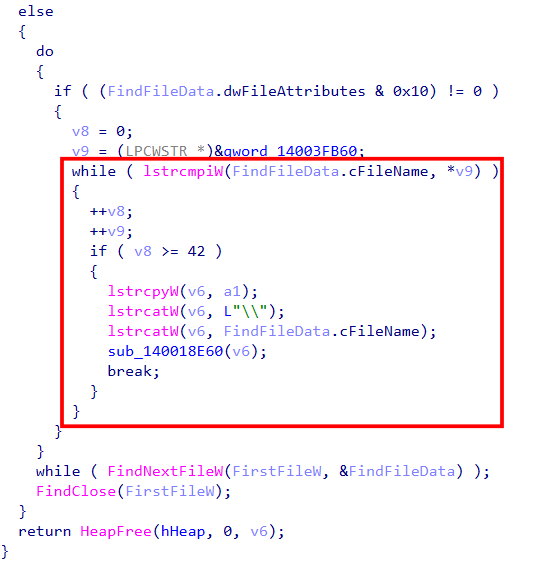
On the other hand, a do while loop begins when the function `FindNextFileW` is called to continue a file search from a previous call to `FindFirstFileW`. Inside this loop, it checks whether the found file has the `FILE_ATTRIBUTE_DIRECTORY` attribute. If it does, `v9` is assigned to an offset of `qword_14003FB60`, which stores the address where the directory name is located, as shown in Figures 51 and 52.

<figure><img src="https://miro.medium.com/v2/resize:fit:719/1*LRjlwQ0wLKvWCCtPN9u8TA.png" alt="" width="563"><figcaption><p>Figure 49. Check if the currently found item is a directory.</p></figcaption></figure>

Now, when it comes to another while loop, it compares the currently found item with `v9` in a case-insensitive manner until it reaches 42, which is the total number of directories. The strings are then concatenated, and the `cFileName` field contains the matched directory after the comparison. This field is then passed as an argument to the recursive function `sub_140018E60`.

This is meant to filter out directories so they are not encrypted by the ransomware itself.

<figure><img src="https://miro.medium.com/v2/resize:fit:691/1*8dWIzcEkbxO2HAsYjg7N1Q.png" alt="" width="563"><figcaption><p>Figure 50. Filtering out current items that match the directories at the specified offset.</p></figcaption></figure>

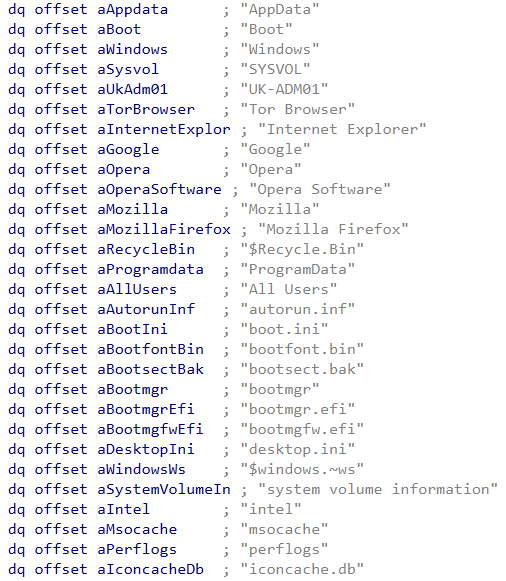
List of addresses of directories names, where they are stored in offset `qword_14003FB60`, which will be used to performed recursive directory scanning.

<figure><img src="https://miro.medium.com/v2/resize:fit:633/1*GV7Kc_ABghkXf7O2Z7elBg.png" alt="" width="563"><figcaption><p>Figure 51. List of directory names (1/2).</p></figcaption></figure>

<figure><img src="https://miro.medium.com/v2/resize:fit:631/1*WlmOJ2W33YNikQzv3lgHMQ.png" alt="" width="563"><figcaption><p>Figure 52. List of directory names (2/2).</p></figcaption></figure>

After those directories are skipped, the command line specific to the `C:` drive is used, and the remaining folders are then concatenated into full words. In this case, `inetpub`, which exists on the dynamic analysis virtual machine.

<figure><img src="https://miro.medium.com/v2/resize:fit:875/1*ZM5UnUXtmPj5wGeGpfZy-Q.png" alt="" height="209" width="700"><figcaption><p>Figure 53. The first directory found that is not filtered out is used.</p></figcaption></figure>

Since the function is called recursively, the count for skipping directories resets. However, if there are no subdirectories within the current directories, the loop continues with the newly found directories and in this case returns to the previous directory, which is the one before `inetpub`.

<figure><img src="https://miro.medium.com/v2/resize:fit:875/1*KHfHotsmKXpMsh3WMYSqWg.png" alt="" height="162" width="700"><figcaption><p>Figure 54. The inetpub directory doesn’t contain any more files.</p></figcaption></figure>

Now, the same command line is used, but this time on the `G:` drive instead of the `C:` drive. At the very beginning of the `G:` drive, the file `cat.png` is found. This means that the argument passed to the recursive call, in this case the `cat.png` file, becomes the parameter used by the `sub_140017B70` function for further encryption.

<figure><img src="https://miro.medium.com/v2/resize:fit:875/1*cp99FzPdEheaKlj5M5ehRA.png" alt="" height="119" width="700"><figcaption><p>Figure 55. The cat.png file will now be used for the encryption process.</p></figcaption></figure>

On the other hand, if there are no more files in the current directory or at the very beginning of the drive, the next directory on the drive will be used to locate files for further encryption.

<figure><img src="https://miro.medium.com/v2/resize:fit:875/1*xIbcpishz1ermNYJarVjyg.png" alt="" height="192" width="700"><figcaption><p>Figure 56. The encme directory is provided and will be used to discover files.</p></figcaption></figure>

However, according to the thread context, when the thread is first created by calling the `CreateThread` function, the `lpStartAddress` field is assigned the `StartAddress` function, which is meant to be executed when the thread starts, while the main thread continues to work as before.

<figure><img src="https://miro.medium.com/v2/resize:fit:875/1*-K7KqKnCSIWD_Ur9QMtOGg.png" alt="" width="563"><figcaption><p>Figure 57. A thread is created with StartAddress as the function to be executed.</p></figcaption></figure>

In the `StartAddress` function, you can see calls to both the function that handles the encryption routine and the one responsible for file extension filtering and dropping ransomware notes. This could explain why, during dynamic analysis, the ransomware notes are already dropped before the execution reaches the encryption routine function.

<figure><img src="https://miro.medium.com/v2/resize:fit:875/1*jiRcVqnyzIr5zZu_0hmlMA.png" alt="" width="563"><figcaption><p>Figure 58. The thread entry point also calls the sub_140017B70 function.</p></figcaption></figure>

In the `sub_140018960` function, if features such as dropping ransom notes and extension filtering are excluded, the logic is similar to previous analyses. First, memory is allocated, and a text file named `Data breach warning.txt` is written to a target location.

<figure><img src="https://miro.medium.com/v2/resize:fit:729/1*sUOoupYpKWT0nrz0xrfhJw.png" alt="" width="563"><figcaption><p>Figure 59. The ransomware note is written.</p></figcaption></figure>

The file extension was also filtered to specify which files should or shouldn’t be encrypted by the ransomware.

<figure><img src="https://miro.medium.com/v2/resize:fit:508/1*FHhqP-8wyWJotUxNxZFyug.png" alt="" width="563"><figcaption><p>Figure 60. The list of filtered out file extensions.</p></figcaption></figure>

Lastly, `sub_140017B70` is called to enter the ransomware encryption routine within the thread context.

<figure><img src="https://miro.medium.com/v2/resize:fit:875/1*ShPGt9ehTShNN2uvLwGWrg.png" alt="" width="563"><figcaption><p>Figure 61. sub_140017B70 is called within a thread context.</p></figcaption></figure>

***

### **Process Discovery (T1057)** <a href="#d660" id="d660"></a>

In the function `sub_140017B70`, an interesting hijacking technique is implemented where the target is a windows service.

According to research from [**CrowdStrike**](https://www.crowdstrike.com/en-us/blog/windows-restart-manager-part-1/), the set of function calls `RmStartSession`, `RmRegisterResources`, and `RmGetList` can be used as a hijacking to prevent specified processes from blocking the current process from accessing files. When implemented in ransomware, the purpose of this behavior is to avoid being denied access during file encryption.

First, the `RmStartSession` function is called to access the functionality of the Restart Manager.

<figure><img src="https://miro.medium.com/v2/resize:fit:823/1*JXfrOQdFGELTRCfZQFUCgQ.png" alt="" width="563"><figcaption><p>Figure 62. Accessing Restart Manager Functionality.</p></figcaption></figure>

After that, the `RmRegisterResources` function is called to register resources with the Restart Manager session that was just started, in order to determine which applications and services must be shut down and restarted.

<figure><img src="https://miro.medium.com/v2/resize:fit:820/1*2XtxJVQShxveME7sAag4pA.png" alt="" width="563"><figcaption><p>Figure 63. Registered to the Started Session.</p></figcaption></figure>

Then, the `RmGetList` function is called to get a list of all applications currently using the registered resources and retrieves their process IDs. It also checks whether its own process ID is in the list of applications and services using the registered resources to prevent itself from being terminated.

<figure><img src="https://miro.medium.com/v2/resize:fit:875/1*eRMlSkZX3dGhI5Wcrr65NQ.png" alt="" width="563"><figcaption><p>Figure 64. Get the List of Applications in the Registered Resources.</p></figcaption></figure>

Finally, the `TerminateProcess` function is called to terminate the process assigned to `v12`.

<figure><img src="https://miro.medium.com/v2/resize:fit:516/1*a8cuoJfQteLiV3cujxaVpg.png" alt="" width="563"><figcaption><p>Figure 65. Terminate the Listed Applications Based on Process ID.</p></figcaption></figure>

***

### **Data Encrypted for Impact (T1486)** <a href="#id-2348" id="id-2348"></a>

In the same function where the hijacking technique is performed, the `qmemcpy` function is used to copy the string `we are ra world. this is finish.` into the destination variable `v73`. However, `v73` has not been identified as being used anywhere else in the code and is not a global variable. This may be presented in a way that claims the current actors are behind the ransomware operation.

After that, `SetFileAttributesW` is called to set the file identified in the previous function (see the [**File and Directory Discovery (T1083)**](#id-99bf) topic for more details) to normal attributes.

<figure><img src="https://miro.medium.com/v2/resize:fit:746/1*Kyiy_PdE8POSbFA4r0nRkg.png" alt="" width="563"><figcaption><p>Figure 66. The threat actor’s unique strings.</p></figcaption></figure>

Now, after memory is allocated and assigned to `v3` and a copy is made in `v4`, the functions `lstrcatW` and `MoveFileExW` are called to append the ransomware extension to the target files. If an error occurs while using the `MoveFileExW` function, the error is then logged.

<figure><img src="https://miro.medium.com/v2/resize:fit:816/1*u2HKYDtFQ5scJOV2SmtyUw.png" alt="" width="563"><figcaption><p>Figure 67. Ransomware extension appended.</p></figcaption></figure>

The `CreateFileW` function is then called with an interesting argument of `0xC0000000`, which represents `GENERIC_READ | GENERIC_WRITE`. The first zero is used to prevent any other process from accessing the file, and the `3u` represents that the file should be opened only if it exists on the device. In short, it attempts to read an existing file while preventing other processes from accessing it.

<figure><img src="https://miro.medium.com/v2/resize:fit:715/1*m3xrKhi3DIHNVs-GGSbHGA.png" alt="" width="563"><figcaption><p>Figure 68. Accesses the target file with the read and write operations as set.</p></figcaption></figure>

If it fails to access a file, the hijacking technique is performed before the next step of the encryption routine starts, to terminate those system applications that are interrupting. See the [**Process Discovery (T1057)**](#d660) topics for more details.

<figure><img src="https://miro.medium.com/v2/resize:fit:875/1*IbUv5QbeMkziheaWHZ_64w.png" alt="" height="443" width="700"><figcaption><p>Figure 69. Windows Restart Manager hijacking starts if file access fails.</p></figcaption></figure>

When the encryption routine starts, the `GetFileSizeEx` function is called to retrieve the size of the file that was just opened, and the result is stored at the address pointed to by `FileSize`.

<figure><img src="https://miro.medium.com/v2/resize:fit:595/1*k84xVBbW-Ifp_rEqLgBCHA.png" alt="" width="563"><figcaption><p>Figure 70. Retrieves the file size.</p></figcaption></figure>

After the file is opened and its size is retrieved, the `CryptGenRandom` function is called. An interesting argument is `hProv`, which is a handle to the cryptographic service provider.

<figure><img src="https://miro.medium.com/v2/resize:fit:875/1*n8bdieKLSag696vgNfbk5Q.png" alt="" width="563"><figcaption><p>Figure 71. The encryption routine is actually performed.</p></figcaption></figure>

At the very beginning of the main function, the global variable `hProv` is assigned the result of `sub_140012800`.

<figure><img src="https://miro.medium.com/v2/resize:fit:758/1*BTN9m-YGtNLNN4qaJxHlog.png" alt="" height="142" width="606"><figcaption><p>Figure 72. hProv is assigned the return value of sub_140012800.</p></figcaption></figure>

The `sub_140012800` function uses `CryptAcquireContextW` to contact and access the RSA cryptographic provider with additional AES capability, without requiring a permanent key. This means that the key is temporarily stored in memory and will be lost when the ransomware process exits or is terminated.

<figure><img src="https://miro.medium.com/v2/resize:fit:769/1*mj8bisq-pQqhZz3peNoO9w.png" alt="" width="563"><figcaption><p>Figure 73. The cryptography provider is accessed for the encryption routine.</p></figcaption></figure>

When it comes to file encryption, it combines both file extension and file size filtering to determine which files are encrypted and how.

The filtering of the file size include files that are less than or equal to `20 MiB`, less than or equal to `5 MB`, and greater than `100 KB`, assuming the calculations are correct.

If the condition is met, the `ReadFile`, `SetFilePointerEx`, and `WriteFile` functions are called to read the target file, set the file pointer at the beginning of the file, and overwrite its contents with encrypted data. The same applies to other conditions, what changes is the file size that will be checked.

<figure><img src="https://miro.medium.com/v2/resize:fit:875/1*aN3usiUVQhWErqKlx00UlA.png" alt="" width="563"><figcaption><p>Figure 74. The file size is filtered for each encryption condition.</p></figcaption></figure>

Now, the file pointer is moved to the end of the file, where the public key material of `Curve25519` is stored.

<figure><img src="https://miro.medium.com/v2/resize:fit:719/1*_SA7McUX770uy-1tWR36Tg.png" alt="" width="563"><figcaption><p>Figure 75. The file pointer is moved to EOF if no condition is met.</p></figcaption></figure>

***

### **Execution Guardrails: Mutual Exclusion (T1480.002)** <a href="#id-526c" id="id-526c"></a>

From goto to `LABEL_55`, it checks whether the mutex with the specific string `For whom the bell tolls, it tolls for thee.` has been created by calling the `OpenMutexA` function. If it turns out that it has not already been created, the `CreateMutexA` function is called to create the mutex with that string.

<figure><img src="https://miro.medium.com/v2/resize:fit:875/1*ApwwM-yJRs8Rl9T8J3ZlQw.png" alt="" width="563"><figcaption><p>Figure 76. Check if a mutex exists, and create one if it does not.</p></figcaption></figure>

***

### **System Network Connections Discovery (T1049)** <a href="#id-23b1" id="id-23b1"></a>

After the mutex is created, the function `sub_140015010` is called with the process command line and the argument count (e.g., `pNumArgs` and `v34`) passed as arguments. If the function returns one, `sub_140019300` is then called.

<figure><img src="https://miro.medium.com/v2/resize:fit:875/1*QgwdjOb_c3UwLKFnPUsBJw.png" alt="" width="563"><figcaption><p>Figure 77. Check if the return value of sub_140015010 is equal to one.</p></figcaption></figure>

Inside the `sub_140015010` function, the logic is similar to what was done in the previous analysis of the [**Command Line Parser**](#c5a6) topic, but this time the command line argument `sf` is checked instead. However, one will be returned only if the argument contains the word `sf`, e.g., `--sf`.

<figure><img src="https://miro.medium.com/v2/resize:fit:406/1*xb4CQvmWbP7BiTDDS5mGZw.png" alt="" width="563"><figcaption><p>Figure 78. Another command line parsing logic.</p></figcaption></figure>

In `sub_140019300`, the functions `WNetOpenEnumW` and `WNetEnumResourceW` are called to enumerate network resources. An interesting argument is `2u`, which represents `RESOURCE_GLOBALNET`, used to enumerate all resources on the network. Another argument, `0`, represents `RESOURCETYPE_ANY`, meaning that all resource types will be enumerated. The found `lpRemoteName` values are then passed as arguments to the `sub_140018E60` function (see the [**File and Directory Discovery (T1083)**](#id-99bf) topic). Otherwise, the function continues recursively.

<figure><img src="https://miro.medium.com/v2/resize:fit:826/1*8i9UQ6ZIU6ynu95fxB0wRg.png" alt="" width="563"><figcaption><p>Figure 79. Enumeration of network resources and connections</p></figcaption></figure>

If no argument is provided, specifically in this case the `--sf` option, the process of enumerating and encrypting network connections and resources is skipped.

<figure><img src="https://miro.medium.com/v2/resize:fit:875/1*Z78ZAk6WhMOGH4cL_c5V6A.png" alt="" width="563"><figcaption><p>Figure 80. No specified command, so certain features are not executed</p></figcaption></figure>

Since the dynamic analysis machine does not have any windows network resources or connections configured, including `VMware Shared Folders`, the function restarts recursively to locate available connections and passes them as an argument to the `sub_140018E60` function.

<figure><img src="https://miro.medium.com/v2/resize:fit:875/1*TKwKhjS66oynaW_BAHk4iA.png" alt="" width="563"><figcaption><p>Figure 81. The specified command is now used, but no network resources are available.</p></figcaption></figure>

***

### **Local Storage Discovery (T1680)** <a href="#fe53" id="fe53"></a>

After the mutex is created and the command line is checked, the function `sub_140012000` is called, followed by local drive enumeration using `GetLogicalDrives`, which retrieves the currently available disk drives. This function returns a bitmask representing the available drive letters, and the loop is limited to `24` to match the number of possible drive letters. If any of these drives exist, the function `sub_1400195A0` is called.

<figure><img src="https://miro.medium.com/v2/resize:fit:875/1*G4sel2t8Q_-qezQ2ggwFfQ.png" alt="" height="376" width="700"><figcaption><p>Figure 82. Enumerate to find available logical drives.</p></figcaption></figure>

After the currently available disk drives are retrieved, the first index, drive letter `A`, is checked to see if it exists. In this case, it does not, so the call instruction is skipped.

<figure><img src="https://miro.medium.com/v2/resize:fit:875/1*POgQAZmuU14shtVKMv58nA.png" alt="" width="563"><figcaption><p>Figure 83. The drive “A:” could not be found on the system.</p></figcaption></figure>

On the other hand, when the index is increased to the drive letter that actually exists on the system, the call instruction is triggered.

<figure><img src="https://miro.medium.com/v2/resize:fit:875/1*a6Gsj06pSdR5_HiwKyXz7A.png" alt="" width="563"><figcaption><p>Figure 84. The drive “C:” was found on the system.</p></figcaption></figure>

This means that, according to the instructions, the drive letter is passed as an argument to the `sub_1400195A0` function. See the [**Network Share Discovery (T1135)**](#id-3b12) topic for more details about this function.

<figure><img src="https://miro.medium.com/v2/resize:fit:875/1*CcWJwlqATj-BstllWUFExg.png" alt="" width="563"><figcaption><p>Figure 85. The drive “C:” is now passed for file and directory discovery.</p></figcaption></figure>

Inside the function `sub_140012000`, there is an array in which each index is assigned a drive letter in the `drive:\` format.

<figure><img src="https://miro.medium.com/v2/resize:fit:270/1*pjcxESAZjTMFN4Wpxz3Zsg.png" alt="" width="563"><figcaption><p>Figure 86. A list of drive letters stored in an array.</p></figcaption></figure>

The do while loop is then executed, looping through each drive letter represented by an index of the `v9` array, as seen in the previous analysis, to determine the drive type. However, if the returned (which is a root path) is invalid, the loop continues to the next index.

<figure><img src="https://miro.medium.com/v2/resize:fit:544/1*9UAotQfw8K7pkDoVLxoiRA.png" alt="" width="563"><figcaption><p>Figure 87. Retrieves the type of a logical drive.</p></figcaption></figure>

Next, it retrieves the name of a volume by calling the functions `FindFirstVolumeW` and `GetVolumePathNamesForVolumeNameW`. However, if `szVolumePathNames` is not equal to three and an error is returned, the volume is mounted instead.

<figure><img src="https://miro.medium.com/v2/resize:fit:875/1*cg6JOVT2CMMm_2XEoEaQUA.png" alt="" width="563"><figcaption><p>Figure 88. Retrieves the volume name and mounts the volume.</p></figcaption></figure>

***

### **Indicator Removal: File Deletion (T1070.004)** <a href="#a180" id="a180"></a>

In the `sub_1400128A0` function, we can see a number of strings, most of which point to the same path, `C:\Windows\Help\`. However, much of the function could not be identified statically (but is still guessable), so the following analysis relies heavily on dynamic analysis.

<figure><img src="https://miro.medium.com/v2/resize:fit:733/1*YbZEy9oquieIpPvRBfWLXg.png" alt="" width="563"><figcaption><p>Figure 89. Unidentified function with possible API calls (1/2).</p></figcaption></figure>

<figure><img src="https://miro.medium.com/v2/resize:fit:640/1*1Xx9i4sUSg3WNkmX-gOjzw.png" alt="" width="563"><figcaption><p>Figure 90. Unidentified function with possible API calls (2/2).</p></figcaption></figure>

The file `Finish.exe` is created in `C:\Windows\Help\`, and when the call instruction at address `140012A1F` is triggered, the data `Hello, World!` is written to it.

<figure><img src="https://miro.medium.com/v2/resize:fit:846/1*iO7GhOuC04wDn2K4Ca50pw.png" alt="" width="563"><figcaption><p>Figure 91. The data was written to Finish.exe.</p></figcaption></figure>

<figure><img src="https://miro.medium.com/v2/resize:fit:875/1*YBleFvGYqGbyfdLt2ucGHA.png" alt="" width="563"><figcaption><p>Figure 92. The contents of Finish.exe.</p></figcaption></figure>

At addresses `140012A48` and `140012A54`, where the call instructions are triggered, files from the previous attack stage begin to be removed.

<figure><img src="https://miro.medium.com/v2/resize:fit:856/1*ddgmDEsu_HWXjNzLwdS0uQ.png" alt="" width="563"><figcaption><p>Figure 93. Files from the previous attack stage begin to be removed.</p></figcaption></figure>

As shown in Figure 94, the files are set up based on threat reports from Palo Alto Networks Unit 42 and Trend Micro. In Figure 95, `Finish.exe` is written, and both `Pay.txt` and `Stage1.exe` begin to be removed.

<figure><img src="https://miro.medium.com/v2/resize:fit:679/1*BNMQDwVqSmTGL2m1mFNwWQ.png" alt="" width="563"><figcaption><p>Figure 94. Files set up based on the threat report.</p></figcaption></figure>

<figure><img src="https://miro.medium.com/v2/resize:fit:654/1*PiqSsXYoMrju2MSnoE45aQ.png" alt="" width="563"><figcaption><p>Figure 95. Files is handled, including writing and removing.</p></figcaption></figure>

***

### **Execution Flow** <a href="#a091" id="a091"></a>

<figure><img src="https://miro.medium.com/v2/resize:fit:875/1*ZsQGt8DXe9F6TsVPs5I2PQ.png" alt="" height="147" width="700"><figcaption><p>Figure 96. RA World Ransomware Execution Flow.</p></figcaption></figure>

***

### **Conclusion** <a href="#id-742f" id="id-742f"></a>

RA World ransomware is built and modified from the leaked Babuk source code, which can be identified through functions such as the command line parser, process termination, and service stopping, where it uses the same code logic. However, based on the analysis of the sample, the changes include the mutex, file extension, ransom note, command line options, and the multi-stage handler, some of which were written or modified by the threat actor. However, it does not employ any packing or obfuscation methods, and administrative privileges are required for full functionality. Also, an encryption algorithm like AES is used to encrypt file contents, and the public keys material of Curve25519 are stored at the EOF.

According to Palo Alto Networks Unit 42 and Trend Micro Threat Hunting Team, RA World uses a multi-stage malware deployment, which we also observed in our analysis. As a result, this report focuses only on the final stage of the overall attack.

Since one of the juiciest targets of this ransomware is network file shares, as shown in this analysis report and reflected in every command line option, proper configuration of network file shares is required for system administrators and engineers.

In case anyone wants to reproduce and test it in their own environment for detection or adversary emulation purposes, the following command lines can be used:

```
--debug=<path>       Write debug logs to a specified path.
--shares=<server>    Targets files for encryption on the specified file sharing server.
--paths=<drive>      Targets files for encryption on the specified drive (shared drives included).
-sf, --sf            Targets files for encryption based on system network connections found.
```

***

### **IOCs** <a href="#id-82b8" id="id-82b8"></a>

```
SHA256: d1ac11cf8a615c0b2d94564d20fe108f7d63f9b36723dc81328ef734a4401f53
MD5: 67d860ac2ab4b0a7e0025263a0484efe
```

***

### **YARA Rule** <a href="#id-8c94" id="id-8c94"></a>

```
rule Mal_WIN_RAWorld_Ransomware_PE {
        meta:
                description = "Use to detect RA World ransomware."
                author = "Phatcharadol Thangplub"
                date = "12-26-2025"
                reference = "https://unit42.paloaltonetworks.com/ra-world-ransomware-group-updates-tool-set/"

        strings:
                $s1 = "debug" fullword wide
                $s2 = "shares" fullword wide
                $s3 = "paths" fullword wide
                $s4 = "C:\\Windows\\Help\\Finish.exe" fullword ascii
                $s5 = "C:\\Windows\\Help\\Stage1.exe" fullword ascii
                $s6 = "C:\\Windows\\Help\\Pay.txt" fullword ascii
                $s7 = "Data breach warning.txt" fullword wide
                $s8 = ".RAWLD" fullword wide
                $s9 = "For whom the bell tolls, it tolls for thee." fullword ascii
                $s10 = "we are ra world. this is finish" fullword wide

        condition:
                uint16(0) == 0x5A4D and filesize >= 200KB and filesize <= 1MB and (5 of ($s*))

}
```

***

### **Additional Resources** <a href="#d32e" id="d32e"></a>

<https://attack.mitre.org/>

<https://socradar.io/blog/dark-web-profile-ra-world/>

<https://unit42.paloaltonetworks.com/ra-world-ransomware-group-updates-tool-set/>

<https://www.trendmicro.com/en_us/research/24/c/multistage-ra-world-ransomware.html>

<https://www.crowdstrike.com/en-us/blog/windows-restart-manager-part-1/>

<https://www.crowdstrike.com/en-us/blog/windows-restart-manager-part-2/>

<br>


---

# Agent Instructions
This documentation is published with GitBook. GitBook is the documentation platform designed so that both humans and AI agents can read, navigate, and reason over technical content effectively. Learn more at gitbook.com.

## Querying This Documentation
If you need additional information that is not directly available in this page, you can query the documentation dynamically by asking a question.

Perform an HTTP GET request on the current page URL with the `ask` query parameter, and the optional `goal` query parameter:

```
GET https://mapol.gitbook.io/home/blog/malware-analysis/ransomware/ra-world-ransomware.md?ask=<question>&goal=<endgoal>
```

`ask` is the immediate question: it should be specific, self-contained, and written in natural language.
`goal` is optional and describes the broader end goal you are ultimately trying to accomplish on behalf of the user. GitBook uses it to tailor the answer towards what is most useful for that goal.

The response will contain a direct answer to the question and relevant excerpts and sources from the documentation.

Use this mechanism when the answer is not explicitly present in the current page, you need clarification or additional context, or you want to retrieve related documentation sections.